The Code_12 game: an island survival mystery
The Code_12 game begins with an unfamiliar island and an uncertain route forward. Notes provide direction, while a flashlight helps you inspect the dark environment. This is the first-person horror title published on Y8, also listed as Code 12 on Gamaverse. It is separate from similarly named programming lessons, barcode tools and films that can appear in search results.
The playable window loads above this guide. You can begin a Code_12 game session without leaving this page, then return to the instructions when a menu or keyboard command is unclear. The following explanation focuses on starting, checking your inventory and approaching exploration. It does not claim a complete route through every note or a guaranteed ending.
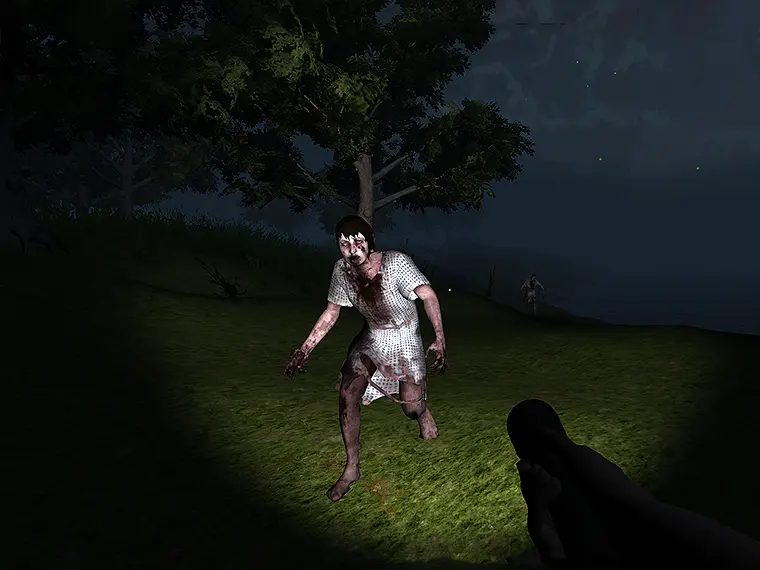
Start without a Y8 account
At the Code_12 game title screen, choose Start Game. The next screen offers Online Save and Offline Save. During our desktop check, selecting Offline Save continued to the island without requiring a login. The notice that you are not logged in concerns the online path; it does not mean that the title screen is the end of your guest session.
The Offline Save panel says that the game will be saved on your computer. Treat that as local browser storage, not a promise that progress follows you to another device. We verified entering through this option, but have not verified restoring a completed session. Clearing site data, changing browsers or opening a private session can affect locally stored information.
Allow the Code_12 game loading screen to finish after choosing a save mode. The island view has a score display and reminders for Pause and Inventory. Seeing those reminders helps distinguish the running scene from the title screen. If you return here for help, pause before reading so you are not dividing attention between the island and the guide.
Movement, inspection and the cursor
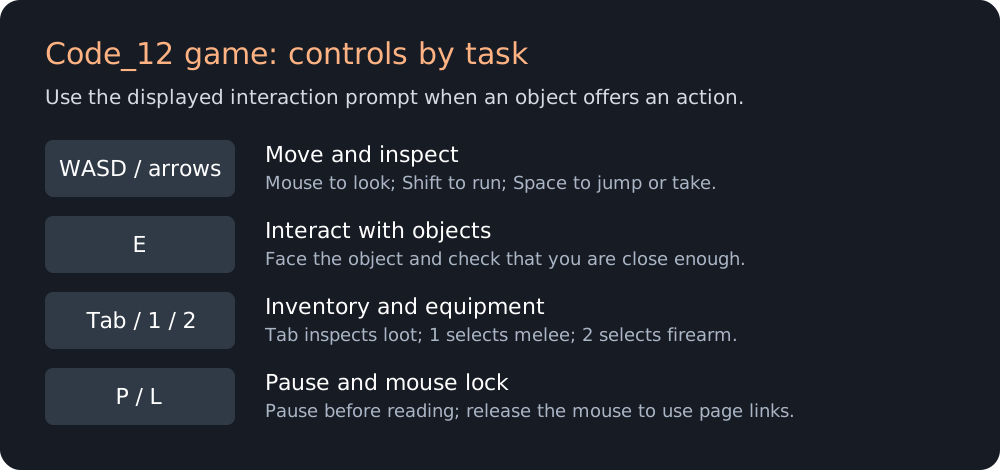
The Code_12 game uses keyboard movement and mouse looking. The publisher lists WASD or arrows to move, Shift to run, Space for jump or take, and E for interaction. Use the instruction shown for the object in front of you rather than treating Space and E as interchangeable everywhere. An object must be within reach and relevant to your current view.
| Input | Purpose |
|---|---|
| WASD / arrows | Move around the environment. |
| Mouse / wheel | Look around / zoom. |
| Shift / Space | Run / jump or take, according to context. |
| E | Interact, pick or leave. |
| Tab / P | Inventory / pause. |
| 1 / 2 / left click | Melee / firearm / attack. |
| L | Switch mouse lock. |
Click inside the Code_12 game before using the keyboard. Press L when you need to change cursor lock, and watch the game's reminder. A pointer that can reach the surrounding page is useful for reading instructions; a locked pointer is useful for turning the camera. Pause and mouse lock serve different purposes, so confirm both when leaving the playing area.
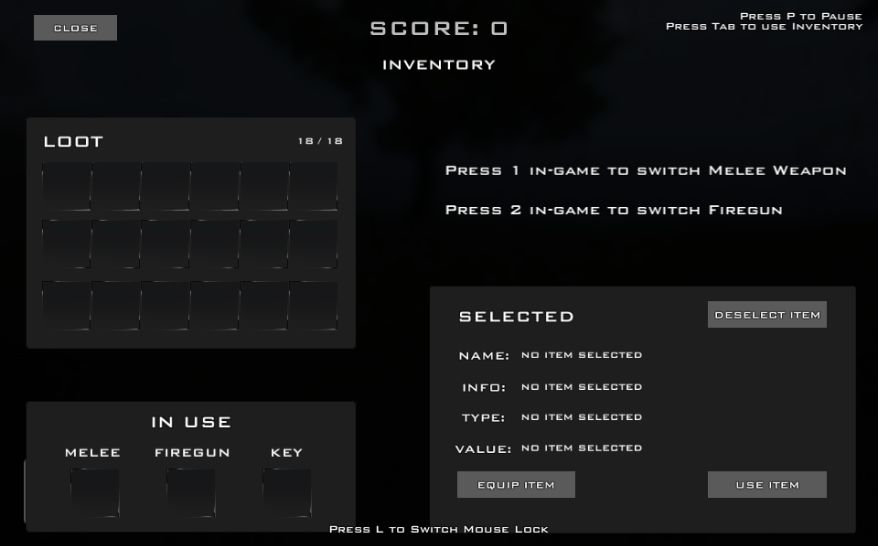
Understand the inventory before using an item
Press Tab in the Code_12 game to open Inventory. The screen separates Loot, In Use and Selected. Loot is where carried objects appear; In Use distinguishes equipment categories, and Selected provides details about the item you have chosen. Opening this screen is an inspection step. It is not the same as automatically equipping everything you have found.
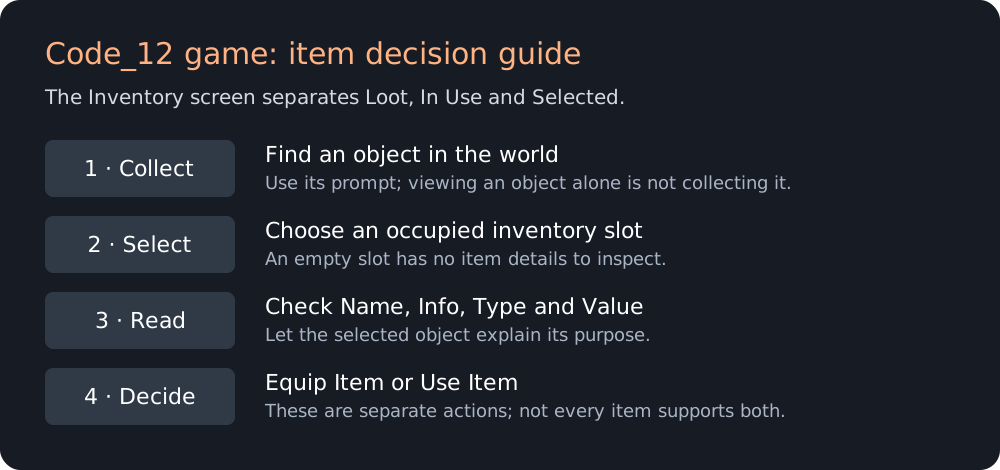
The Selected panel includes Name, Info, Type and Value. Read those fields before deciding what to do. The interface offers Equip Item and Use Item separately, with Deselect Item available above. That distinction matters: equipping an object prepares it for a role, while using an object can apply its effect. Do not assume every object supports both actions.
Our Code_12 game check reached this inventory from a guest session and returned to the island with Tab. The initial view had no selected object, so the empty detail fields were expected. If your inventory looks similar, first confirm that you have actually picked up something. Clicking an empty slot cannot explain the properties of an object still lying in the world.
Explore by following evidence
The publisher's Code_12 game description places an early note and flashlight at a tree and identifies notes as directions for further exploration. Read a note before leaving its location. Remember the nearest landmark and the direction you approached from, so a sudden turn or frightening encounter does not erase your mental picture of the route.
Available supplies include keys, medical items, weapons and batteries. Give each discovery a purpose: a key suggests an access problem, a medical item relates to survival, and a battery relates to your light. Those are categories, not a claim that every locked entrance uses the next key you find. Let the current object's information and the surrounding clues guide the decision.
A careful Code_12 game attempt alternates inspection with movement. Stop somewhere you can recognize, look across the area, then choose the next place to check. This is suggested playing advice, not a tested speedrun route. Avoid inventing a destination from the title alone; the notes are a better source for the island's next step than a generic horror-game habit.

Code_12 game questions and troubleshooting
Can I play with friends online?
The publisher classifies the Code_12 game as single-player. Online Save concerns saving, not a multiplayer lobby. Choose it only for the account-based saving option you intend to use; do not expect a friend invitation or cooperative island session. For a shared local racing session, see Mayhem Racing and its separate two-player controls.
Can I play on a phone?
The publisher lists desktop play. The guide fits a phone, but the Code_12 game expects keys and mouse input. Resizing the player does not create touch controls. Use a computer for exploration and inventory management rather than assuming that a visible loading screen proves mobile compatibility.
Why does an object not respond?
First check whether looking, movement and Tab still respond. If they do, distinguish an unreachable object from an unresponsive game. Move closer, face the object and follow its displayed prompt. When inspecting inventory, choose an occupied slot and read its information before trying Equip Item or Use Item.
Is a download required?
This Code_12 game window is the provider's browser build. It does not ask you to install an executable from this site. A loading failure is not a reason to download a random file bearing the same title. If the provider remains unavailable, choose another companion game and try again later.
Continue exploring
For another note-searching horror experience, try Nox Timore. For a different island survival setting, see The Forsaken Lab 3D. Both have their own controls and objectives. Return to the 20-game collection for driving and racing choices.
Game identity and published controls: Y8's game listing. The inventory and start sequence were observed in the embedded build. Blockdeck provides an independent guide and is not the game's developer.
For a longer Code_12 game demonstration, see GamingWithAdzzz's recorded session. Its title calls the game Flash, but the current supplied browser build uses WebGL; a video title is not an installation requirement.